Hi there! 👋 We are two No-Code makers taking part in No Code November (check it out). We are travelling at the moment and focusing on building products that solve problems we face daily, all without writing a single line of code! Throughout November we will be releasing (at least) 3 free apps that focus on travel related challenges in the fields of personal finance, productivity and health.
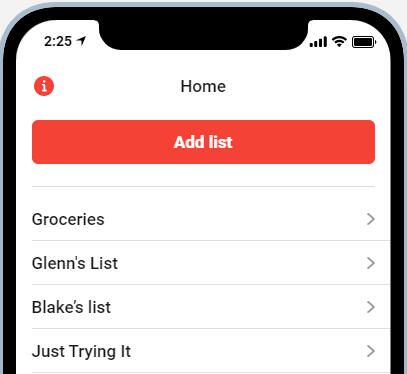
There's always something to do, right? Keep your tasks organized while you're traveling with "do.it". Separate lists, due dates and a notes section is included in this app. More features to come!
How to use the App (in 5 easy steps):
1) Get your version of the app: Click on the following link The link will add the app to your Glide accounts app Library. If you don't have an account, you'll be asked to sign in to Glide with your Gmail.
2) Editing the app: Select the "Travel Wallet" tile in your Glide library, which will let you edit the app.
3) Create your personal URL: Select "Share app" in the menu on the left, and then press "Publish app" on the right side of your screen. You'll then be able to change the URL used to reach it.
4) Keeping it private: Select "Settings" in the menu on the left, and then click on "Privacy" on the upper right hand side of your screen. Choose a Sign-in with a password, type your password.
5) Let's go! Travel Wallet is ready to be used under the link you have chosen and after inputting the right password. Enjoy!
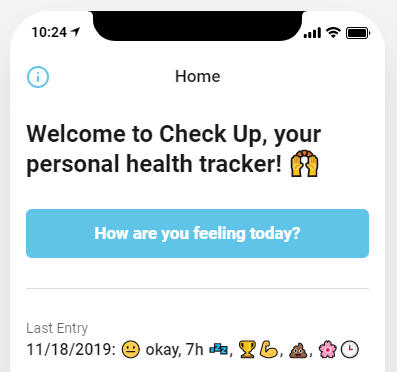
When you're traveling or just very busy, it can be really hard to keep track of good habits and how they make you feel. Not anymore! With "Check Up", you can quickly log how you feel and see how your habits influence your mood.
How to use the App (in 5 easy steps):
1) Get your version of the app: Click on the following link The link will add the app to your Glide accounts app Library. If you don't have an account, you'll be asked to sign in to Glide with your Gmail.
2) Editing the app: Select the "Travel Wallet" tile in your Glide library, which will let you edit the app.
3) Create your personal URL: Select "Share app" in the menu on the left, and then press "Publish app" on the right side of your screen. You'll then be able to change the URL used to reach it.
4) Keeping it private: Select "Settings" in the menu on the left, and then click on "Privacy" on the upper right hand side of your screen. Choose a Sign-in with a password, type your password.
5) Let's go! Travel Wallet is ready to be used under the link you have chosen and after inputting the right password. Enjoy!
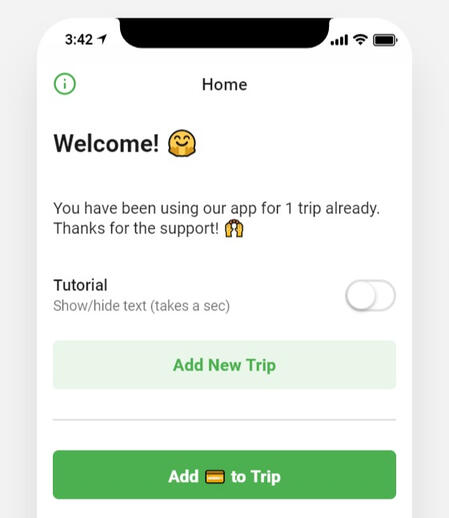
Sharing expenses doesn't have to be hard! 🙌 With this app you can track group expenses to see who owes whom what (max. 2 participants right now)
Why use split.it
✔️ Ownership & Privacy: The app is free and the data you input is kept in a Google Sheet that's private to you ✔️ Web Based: No download! Access split.it from any device and from anywhere just by visiting your private URL ✔️ Tracking: Never lose track of your shared expenses ✔️ Analysis: Do a personalized analysis of your data in your Google Sheet ✔️ Support No-Code: Discover a great No-Code tool
How to use the App (in 5 easy steps):
1) Get your version of the app: Click on the following link The link will add the app to your Glide accounts app Library. If you don't have an account, you'll be asked to sign in to Glide with your Gmail.
2) Editing the app: Select the "Travel Wallet" tile in your Glide library, which will let you edit the app.
3) Create your personal URL: Select "Share app" in the menu on the left, and then press "Publish app" on the right side of your screen. You'll then be able to change the URL used to reach it.
4) Keeping it private: Select "Settings" in the menu on the left, and then click on "Privacy" on the upper right hand side of your screen. Choose a Sign-in with a password, type your password.
5) Let's go! Travel Wallet is ready to be used under the link you have chosen and after inputting the right password. Enjoy!
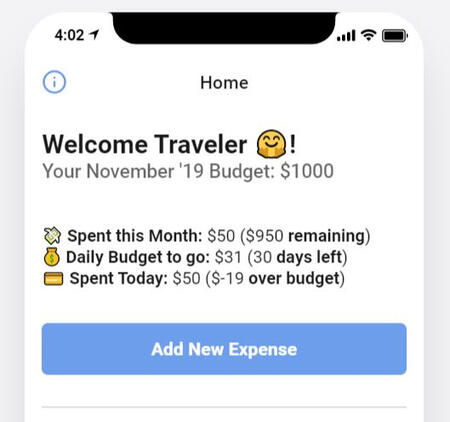
While travelling on a budget, we've struggled with keeping track of our expenses. But the struggle is no more! 🙌 With this app you'll track your expenses and always stay up-to-date as to how much you have left to spend on any given day.
Why use Travel Wallet
✔️ Ownership & Privacy: The app is free and the data you input is kept in a Google Sheet that's private to you ✔️ Web Based: No download! Access Travel Wallet from any device and from anywhere just by visiting your private URL ✔️ Tracking: Never lose track of your expenses and budget ✔️ Analysis: Do a personalized analysis of your data in your Google Sheet ✔️ Support No-Code: Discover a great No-Code tool
How to use the App (in 5 easy steps):
1) Get your version of the app: Click on the following link The link will add the app to your Glide accounts app Library. If you don't have an account, you'll be asked to sign in to Glide with your Gmail.
2) Editing the app: Select the "Travel Wallet" tile in your Glide library, which will let you edit the app.
3) Create your personal URL: Select "Share app" in the menu on the left, and then press "Publish app" on the right side of your screen. You'll then be able to change the URL used to reach it.
4) Keeping it private: Select "Settings" in the menu on the left, and then click on "Privacy" on the upper right hand side of your screen. Choose a Sign-in with a password, type your password.
5) Let's go! Travel Wallet is ready to be used under the link you have chosen and after inputting the right password. Enjoy!
Feedback
We welcome feedback in all forms to improve the v1.0 of Travel Wallet and split.it. So don't hesitate to write us on Twitter (links below)!
NEWSLETTER
Join our newsletter to stay up to date with the products we launch
Thanks for subscribing. Please check your email and click the link to confirm.
if you don't receive an email within 1 hour, please check your spam folder and mark our emails as non-spam.